
Updated July 2026
Every freelancer knows the three most expensive words in client work: “Can you just…” Can you just add one more page? Can you just tweak the colors? Can you just include a blog section? Each request feels small. Together, they quietly turn a profitable project into unpaid overtime, and the invoice still says the original number. This is scope creep, and a proper scope creep tracker is the difference between catching it in real time and discovering it only when you tally your hours at year-end.
If you’ve ever delivered far more than you quoted for the same flat fee, this guide is for you. Below is why scope creep drains freelance income, why the usual fixes fail, and the simple system, built into a ready-to-use scope creep tracker, that makes every out-of-scope request visible and billable before you’ve already done the work for free.
The Real Cost of “Sure, I Can Add That”
Scope creep isn’t a fringe problem, it’s the majority experience in project work. According to the Project Management Institute’s research, around half of all projects experience scope creep, and for freelancers working without formal change-control processes, the rate is almost certainly higher. Industry analyses put creative and freelance work among the most affected categories of all.
The financial damage is real. Independent estimates suggest an active freelancer loses somewhere in the range of $2,000 to $5,000 per year to unpaid scope-creep work, assuming a normal load of projects with typical overruns of 15-25%. And that figure is likely conservative, because most freelancers never track scope creep formally. They absorb small additions one at a time and never see the cumulative cost, which is exactly the gap a scope creep tracker closes.
Here’s the mechanism that makes it so costly. On a fixed-price project, the invoice total stays the same no matter how many hours you pour in. So the damage is invisible until the project ends and you calculate your real effective hourly rate, and realize it quietly dropped from your headline number to a fraction of it. A scope creep tracker exists to make that damage visible while you can still do something about it.
Why Spreadsheets Don’t Solve Scope Creep
Most freelancers’ first instinct is to log change requests in a spreadsheet. It rarely lasts. The problem isn’t recording a request, it’s connecting the dots. A flat spreadsheet doesn’t tell you “this project is now 28% over the agreed scope and still climbing.” It doesn’t flag that the change you approved last week pushed the project from healthy into danger territory.
To actually control scope creep, you need three things working together:
A baseline, the deliverables agreed in the original scope, documented so you have proof of what “included” means. A change log, every request that falls outside that baseline, each with a dollar value attached. And a health metric, a real-time percentage showing how far the project has drifted from the original agreement.
When those three connect, scope creep stops being a vague end-of-project surprise and becomes a number you can watch. And a problem you can see is a problem you can solve. That real-time visibility is the whole point of a scope creep tracker. That’s exactly what a purpose-built scope creep tracker does that a spreadsheet can’t.
The System: Baseline, Change Log, Health Metric
The system behind an effective scope creep tracker uses three linked parts. Every project starts with its original budget and a list of agreed deliverables (the baseline). When a client asks for something extra, you log it as a change order, estimated hours, your hourly rate, and any impact on the deadline. The system calculates the cost automatically and updates the project’s scope-creep percentage in real time.
The output is a simple traffic-light view. Green means the project is healthy (low creep). Yellow means watch it. Red means stop and have a conversation before you do any more unpaid work. Instead of finding out at the end that you worked for free, you see a project drifting toward yellow at the third “quick request”, while there’s still time to send a change order or draw a line.
The key insight is that this isn’t about being difficult with clients. It’s about making the cost of extras visible before you agree to them, not after. When you can show a client “here are the deliverables we agreed to, and here’s the blog section that’s outside that scope, $X and one extra week,” there’s nothing to argue about. Clients approve documented change orders far more often than most freelancers expect, because the request is factual and professional, not a confrontation.
How a Scope Creep Tracker Works in Practice
Picture the common scenario. A web-development client asks you to add a blog section, six pages, not in the original scope.
Without a system: “Sure, I’ll squeeze it in.” It eats sixteen hours. It never makes it onto an invoice. Your effective rate quietly drops.
With a scope creep tracker: you log it as a change order. Sixteen hours at your rate calculates the cost automatically. Status: pending approval. Deadline impact: plus one week. You send the client a short, professional note: “Here’s the change order for the blog section, additional cost and one extra week on the timeline. Approve and I’ll start this week.” Because it’s documented against the agreed scope, the client can see exactly what’s original and what’s extra, and approval is usually quick and painless.
The change didn’t get harder to ask for. It got easier to bill for, because the documentation removed the awkwardness on both sides.
The Broader Picture: Visibility Beats Willpower
The reason scope creep is so hard to beat with discipline alone is that it never arrives as one big demand. It comes as small, reasonable-sounding requests spread over weeks, each easy to say yes to in the moment. Willpower fails against that pattern; visibility doesn’t. This is the same principle behind managing any hidden, creeping cost, whether it’s unbilled hours or software spend, if you don’t measure it in real time, you pay for it later. (We make the same argument about invisible tech spend in our guide to the hidden cost of AI tools in 2026, and about lean operating costs in reducing costs for small businesses.)
The freelancers who protect their income aren’t the ones with the strongest boundaries by force of will. They’re the ones with a system that catches out-of-scope work early, attaches a number to it, and turns it into a documented decision instead of a silent freebie.
The Scope Creep & Change Order Tracker (Notion Template)
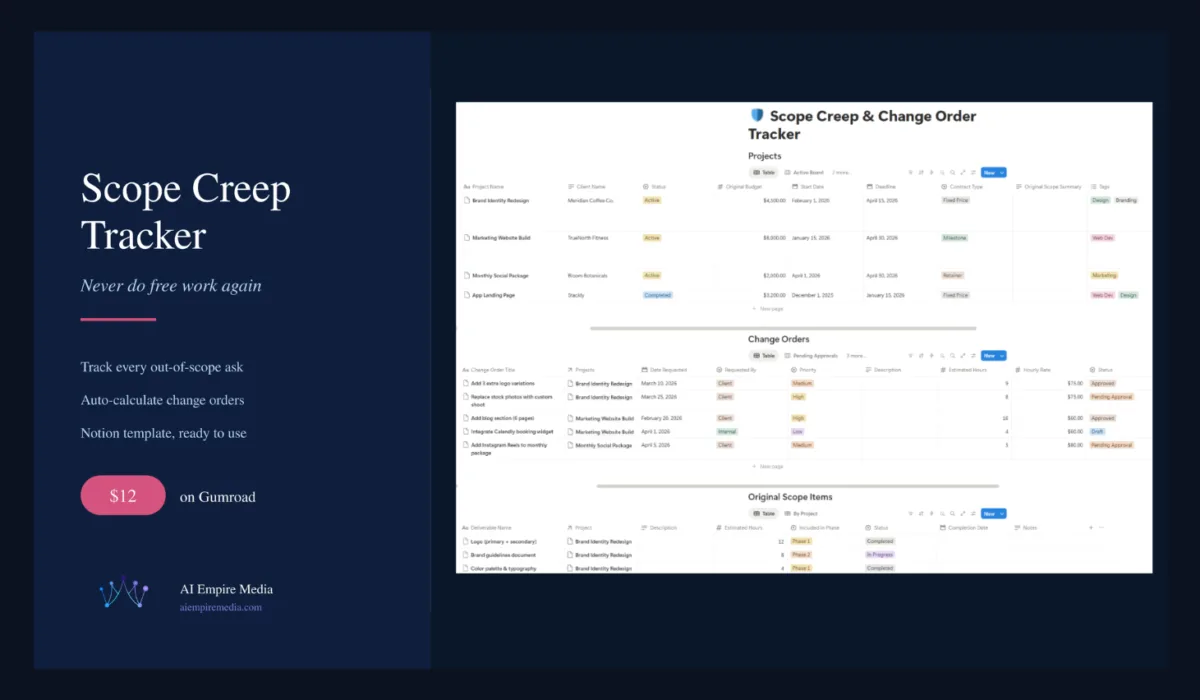
Rather than build this from scratch, you can use a ready-made scope creep tracker. The Scope Creep & Change Order Tracker is a Notion template that packages the entire system into a tool you can start using in minutes.
What’s included:
A projects dashboard with real-time scope-creep percentage and traffic-light health indicators, so you always know which projects are healthy and which need a conversation. A change-order database with auto-calculated cost impact, log any request in about thirty seconds. An original-scope-items tracker, so you document what was agreed and have proof when a project starts to grow. A pending-approvals board, so you never start extra work without a paper trail. An “approved and ready to invoice” view, so you can see exactly how much recoverable revenue is waiting to be billed. A creep leaderboard to instantly spot your riskiest projects before they spiral. And timeline and calendar views to visualize changes against your deadlines.
It comes pre-loaded with realistic sample data across several projects so you can see the system working immediately, and it runs entirely on Notion’s free plan, no paid subscription required. For solopreneurs and small teams, a lightweight Notion setup like this often beats complex project-management software that runs $30-50/month for features you won’t use.
What Actually Stops Scope Creep
If you take nothing else away, take these four habits, all of which a good scope creep tracker makes automatic.
Track every change request the moment it happens, not later, not “when you have time.” The whole game is catching it in real time, which is what a scope creep tracker is designed to do. Attach a dollar value to every extra: hours times your rate equals cost, no guessing. Show clients the documentation, framed as professional project management (“here’s what we agreed, and here’s what’s additional”), and most will approve without friction. And watch the scope-creep percentage, when it crosses your threshold, stop and reassess before you’re working for free.
FAQs About Scope Creep and Change Orders
What is scope creep in freelancing?
Scope creep is when a project grows beyond the originally agreed deliverables without a matching change to the budget, timeline, or contract. It usually happens through small, reasonable-sounding requests that accumulate over time, until you’ve delivered significantly more than you quoted for the same flat fee.
How much does scope creep actually cost freelancers?
Independent estimates put the loss at roughly $2,000 to $5,000 per year for an active freelancer, and often more for those on larger or enterprise projects. The real figure is likely higher because most freelancers don’t track out-of-scope work, so they absorb the cost without ever seeing the full total. A scope creep tracker is what turns that invisible loss into visible, billable change orders.
How do I stop scope creep without upsetting clients?
The key is documentation, not confrontation. Define the deliverables clearly up front, then log every out-of-scope request as a change order with a cost and timeline impact, and present it professionally. Framed as “here’s what we agreed and here’s what’s extra,” clients approve documented change orders far more often than freelancers expect, because there’s nothing to dispute.
Do I need special software, or is a spreadsheet enough?
A spreadsheet can log requests but can’t connect them into a real-time health metric, so it usually fails to catch creep as it happens. A dedicated scope creep tracker links your original scope, your change orders, and a live percentage so you can see a project drifting before it’s too late. The Notion template above does exactly this and runs on Notion’s free plan.
Who is the Scope Creep & Change Order Tracker for?
This scope creep tracker is built for freelancers, consultants, and small agencies working on fixed-price or retainer projects, anyone vulnerable to “just one more thing” requests eroding their effective rate. If you’ve ever finished a project and realized you did far more than you billed for, this scope creep tracker is designed to make sure it doesn’t happen again.
The Bottom Line
Scope creep is one of the most common and most expensive problems in freelance work, and it’s rarely caused by unreasonable clients. It’s a systems problem: without a way to see out-of-scope work as it happens, small additions accumulate into thousands in unpaid labor every year. The fix isn’t stronger willpower, it’s visibility.
A simple scope creep tracker, with a documented baseline, a costed change log, and a real-time health metric, turns invisible free work into documented, billable change orders, and turns the awkward “that’s extra” conversation into a routine, professional one. If you’re ready to stop giving your time away, the Scope Creep & Change Order Tracker packages the whole system into a Notion template you can put to work today.

Mahdi Ayadi writes and edits AI Empire Media. He covers AI models, tools and pricing with one question in mind: is this actually worth paying for?
Before writing about software, Mahdi spent more than seven years selling it, in B2B SaaS sales and account management across cybersecurity, marketing technology and travel technology. That experience shapes how he reads vendor pricing pages, benchmark claims and feature lists, and it’s why his articles focus on real costs, trade-offs and sources readers can check for themselves.
He also builds AI-powered automation for sales and onboarding workflows, which informs his coverage of AI agents and automation tools. He works in English, French, Arabic and Russian.
Connect on LinkedIn →